LightBurn Software: The Complete Guide for CO2 Laser Cutter Users
LightBurn is the software that comes installed on most professional CO2 laser cutters — and for good reason. It handles everything from design layout and file import to laser control, job preview, and material settings, all in a single application.
Every Vision Series CO2 laser that leaves our workshop with LightBurn included as standard. Our engineers use it daily, train customers on it, and support it across the full range of machines. This guide covers what LightBurn does, how to get started, and how it compares to RDWorks.
What Is LightBurn Software?
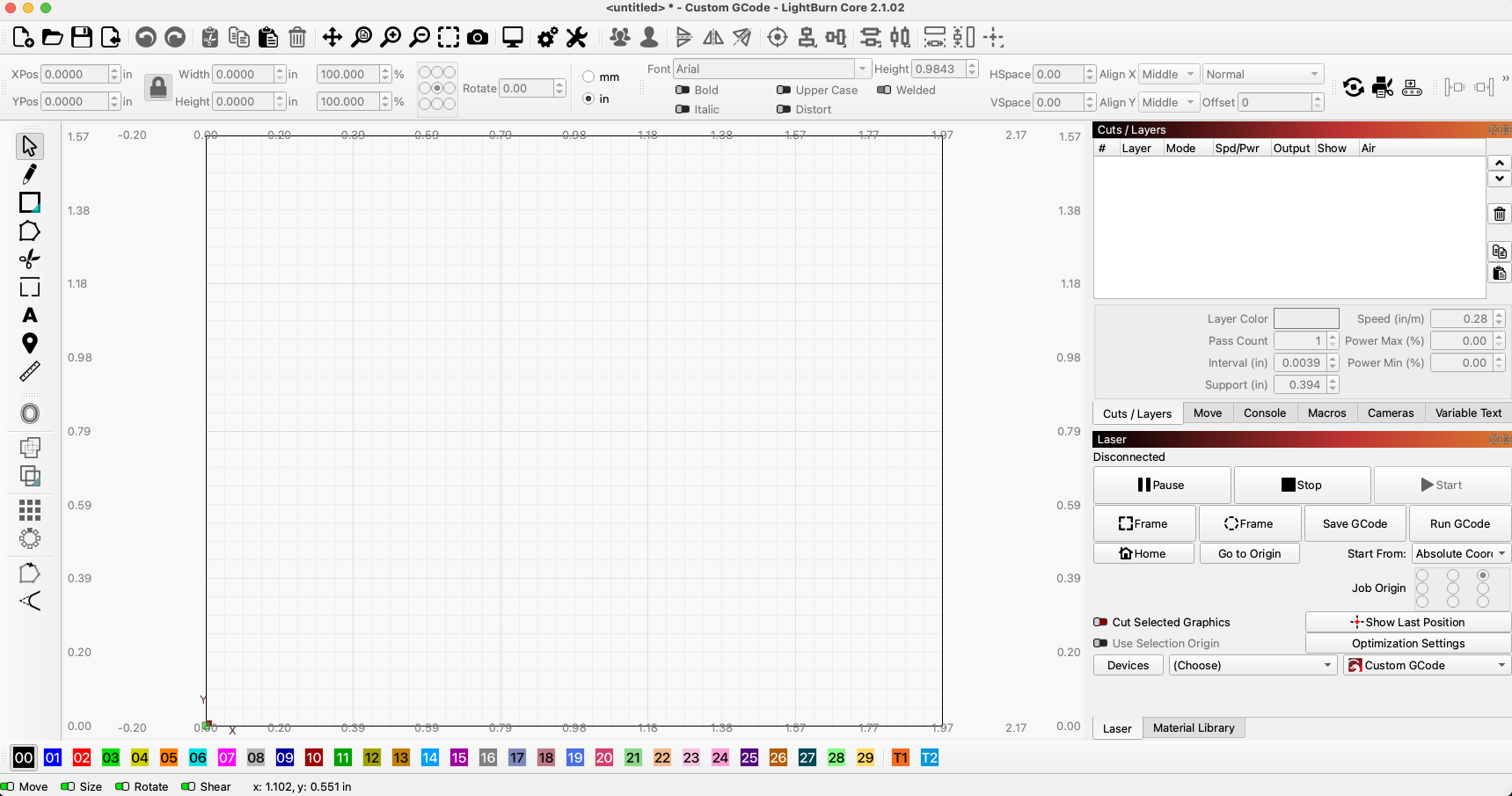
LightBurn is a laser control and layout application designed for CO2, diode, and fibre laser machines. It replaces the need for separate design and control software. You can create or import your artwork, assign layer-specific cutting and engraving settings, preview the full job, and send it directly to the machine, all from the same interface.
It runs natively on Windows and macOS (Linux support was discontinued starting with version 1.7) and connects to the laser via USB, Ethernet, or WiFi.
LightBurn is developed and maintained by LightBurn Software, Inc., with regular updates and an active user forum. It's not open-source or free — it's a paid, perpetual licence with a 30-day trial.
LightBurn for CO2 Lasers: Ruida DSP and LightBurn Pro
Not all LightBurn licences are equal, and choosing the wrong one is a common mistake.
Every Vision Series CO2 laser uses a Ruida DSP controller — the professional-grade controller standard across serious CO2 machines. Ruida is a DSP (Digital Signal Processor) controller, not a GCode-based system. LightBurn Pro is required for Ruida-controlled machines.
If you're buying LightBurn for a professional CO2 laser cutter with a Ruida, Trocen, or TopWisdom controller, you need LightBurn Pro — not the base Core licence.
This distinction matters because:
LightBurn Core supports GCode-based machines (typically hobbyist diode lasers)
LightBurn Pro adds full DSP controller support, including Ruida, which is what your CO2 machine runs
Our engineers configure LightBurn Pro on every Vision Series machine at the point of installation. If you're setting up a machine yourself, confirm your controller before purchasing the licence.
LightBurn Core vs LightBurn Pro: Which Do You Need?
| Feature | LightBurn Core | LightBurn Pro |
|---|---|---|
| Best for | GCode diode lasers | CO2 lasers with Ruida/Trocen/TopWisdom DSP |
| Controller support | GCode (GRBL, Marlin, Smoothieware) | GCode + DSP + Galvo (EZCAD2) |
| Vision Series compatible? | ❌ No | ✅ Yes |
| Price (USD) | $99 | $199 |
| Annual update renewal | $40 | $40 |
Both licences are perpetual; you own the version you buy. After the included 12-month update period expires, you can continue using the last version you received without paying again. Paying the annual renewal gives you access to all new releases for another year.
For CO2 laser cutters on Ruida DSP, LightBurn Pro is the correct license. There's no workaround — Core simply won't connect to a Ruida controller.
How Much Does LightBurn Cost?
LightBurn prices in USD. As of June 2026:
LightBurn Pro: $199 USD (~£157–£165 depending on exchange rate)
LightBurn Core: $99 USD (~£78–£82)
Annual update renewal: $40 USD (~£31–£33)
LightBurn offers a 30-day free trial with full functionality — no features locked, no watermarks. This is a genuine trial, not a demo version. If you have a Vision Series machine, we recommend starting with the trial to get comfortable before purchasing.
LightBurn does not offer subscription pricing. It's a one-off purchase.
Key LightBurn Features for CO2 Laser Cutting
Layers and Cut Settings
LightBurn uses a colour-coded layer system. Each colour layer is assigned its own operation — engrave, cut, score, or tool — with independent speed, power, pass count, and air-assist settings. This means a single file can contain multiple operations that run in sequence: engrave the surface first, then cut the outline.
The rule of thumb: engrave before you cut. Once a cut-through frees a piece from the sheet, it can shift — and any remaining engraving on a loose part will be misaligned. LightBurn lets you control layer order manually.
Material Library
LightBurn's Library feature stores named presets for every material and thickness you work with. Once you've dialled in the settings for 3mm acrylic or 6mm birch ply, save them — and next time, apply them to any layer with one click. This removes the guesswork from repeat jobs and keeps settings consistent across your team.
For schools, makerspaces, or small production environments, a well-maintained material library is one of the biggest time-savers LightBurn offers.
Job Preview and Simulation
Before sending any job to the machine, use the Preview function. It renders the full laser path as an animation — you can see exactly which elements engrave, which score, and which cut, and in what order. Run this every time, especially on complex files or expensive materials. It takes 10 seconds and can save a wasted sheet.
Ruida DSP Controller Integration
With a Ruida-connected machine, LightBurn handles all machine communication directly: job transfer, start/stop control, real-time position display, and controller settings. You can manage file transfers over USB, Ethernet cable, or WiFi — all natively supported. The Ruida status panel within LightBurn shows machine state, remaining time, and laser enable status.
File Format Support
LightBurn imports AI, SVG, PDF, DXF, PLT, BMP, JPEG, PNG, and more. For most workflows, this removes the need to convert files before import. Vector formats (SVG, DXF, AI) import cleanly for cutting; raster formats (JPEG, PNG, BMP) are used for photo engraving or image tracing.
LightBurn vs RDWorks: Which Should You Use?
Both LightBurn and RDWorks are compatible with Ruida DSP-controlled CO2 lasers, and both are capable applications. The question we get most often is: which should I learn?
Our answer: LightBurn, for most users — but RDWorks has its place.
| Feature | LightBurn Pro | RDWorks |
|---|---|---|
| Cost | $199 USD (one-off) | Free |
| Interface | Modern, logical | Functional, dated |
| Design tools | Full vector editing, tracing, text tools | Basic |
| Material library | Built-in, easy to manage | Manual |
| File import | SVG, AI, PDF, DXF, PNG, JPEG + | Limited |
| Multi-machine support | Yes — create profiles for each machine | Machine-specific |
| Active development | Yes — regular updates | Infrequent |
| Learning resources | Extensive — YouTube, official docs, community forum | Limited |
When RDWorks makes sense: If you already have a workflow built around RDWorks, there's no urgent reason to switch. RDWorks is stable, free, and handles production jobs reliably. Some experienced operators also prefer its direct approach to job settings.
When to choose LightBurn: If you're starting from scratch, working with complex files, or want to share settings and workflows between machines, LightBurn is the better long-term investment. The design tools are significantly stronger, the documentation is thorough, and the development team actively responds to user feedback.
We include LightBurn Pro with every Vision Series machine as standard. We also offer LightBurn training for teams who want to get up to speed quickly.
Tips From Our Engineers
These are the things we tell every customer at installation:
Use the material library from day one. Don't rely on memory or sticky notes. The first time you get a setting right, save it with the material name, thickness, and supplier. Future-you will thank you.
Set layer order intentionally. LightBurn processes layers top to bottom in the Cuts panel. Put engraving layers above cut layers. This is the single most common source of misaligned engravings in early jobs.
Run the preview every time. It takes 10 seconds. It has saved thousands of sheets of material from being wasted.
Don't blindly copy settings from the internet. YouTube settings are shot on different machines with different tubes, lenses, and air-assist setups. They're a starting point. Run a material test grid and find your own numbers.
Check your lens before diagnosing a power problem. A dirty or misaligned lens will cause inconsistent cutting and appear to be a power drop. Clean the lens first, always. See our guide to CO2 laser cutter maintenance for the full routine.
LightBurn's camera is useful for repeat jigs. If you're running production batches on fixed jigs, the camera alignment tool saves time. Calibrate it once, and positioning becomes visual rather than measured.
The difference between a CO2 laser that feels difficult and one that feels effortless usually comes down to how well the operator knows LightBurn. If your team needs training — whether one-to-one, on-site, or remote — speak to our team and we'll arrange it.
Speak to Our Engineers
If you have questions about LightBurn on a Vision Series machine — settings, workflow, licence choice, or training — our engineers are available by phone. Not a ticket queue. Not a chatbot.
Speak to our engineers — or explore the full Vision Series range.
Frequently Asked Questions: LightBurn Software
Is LightBurn free?
No — but there's a full-featured 30-day free trial with no restrictions. After the trial, a paid licence is required to continue using the software.
How much does LightBurn cost in the UK?
LightBurn is priced in USD. LightBurn Pro — the correct licence for Ruida DSP CO2 lasers — is $199 USD. LightBurn Core (for GCode/diode machines) is $99 USD. The annual update renewal is $40 USD. Your card will be charged in USD; the GBP equivalent depends on the current exchange rate.
Is LightBurn a subscription?
No. LightBurn is a perpetual licence — you buy it once and own that version. After the 12-month update period ends, you can keep using the last version you received indefinitely. Paying the annual renewal ($40 USD) gives you access to all new releases for another year.
Can I use LightBurn on more than one computer?
A single LightBurn licence can be activated on up to two computers simultaneously. This is enough for most setups — typically a workshop computer connected to the machine and a design computer elsewhere.
Does LightBurn work with Ruida DSP controllers?
Yes — this is LightBurn Pro's primary use case. Ruida-controlled CO2 lasers are among the most widely supported machines in LightBurn. All Vision Series CO2 lasers use Ruida DSP and are fully compatible with LightBurn Pro.
What operating systems does LightBurn support?
LightBurn 2.x supports Windows 10 and later, and macOS 11 (Big Sur) and later. Linux support was removed from LightBurn version 1.7 onwards.
What file formats does LightBurn support?
LightBurn imports: AI, SVG, PDF, DXF, PLT (vector formats) and BMP, JPEG, PNG, GIF, TIFF (raster formats). It also saves its own native .lbrn2 project format.
What do the different layer colours mean in LightBurn?
Colours assign objects to operation layers — they don't represent the colour of the output. Objects on the same layer share the same settings (speed, power, operation type). Use multiple layers in a single file to assign different operations: for example, blue layer = engrave, red layer = cut.
How do I build a material library in LightBurn?
Open the Library panel (Window → Library). Click New to create a library file. Then assign a layer setting, right-click the layer in the Cuts panel, and choose Save to Library. Name it with material, thickness, and supplier (e.g. "Acrylic clear 3mm — RS Components"). Apply saved settings to future jobs with a single click.
What's the difference between LightBurn and RDWorks?
Both work with Ruida DSP CO2 lasers. RDWorks is free but has limited design tools and infrequent updates. LightBurn Pro costs $199 USD, offers a far more capable design environment, active development, and better file import. For anyone starting from scratch on a CO2 machine, LightBurn is the better long-term choice. For experienced RDWorks users with established workflows, there's no urgent reason to switch — both get the job done.
Does LightBurn replace CorelDRAW or Adobe Illustrator?
Not entirely. LightBurn includes vector editing tools — node editing, boolean operations, text, image tracing — but for complex illustration or advanced typographic work, many users still design in CorelDRAW or Illustrator and import the finished file into LightBurn. LightBurn handles job setup and machine control; your preferred design software handles art creation.